Screen Recorder | Video Rec
- 4.8
- Rating
- 100.00K
- Installs
- Free
- Price

 Analysis by App-foxy
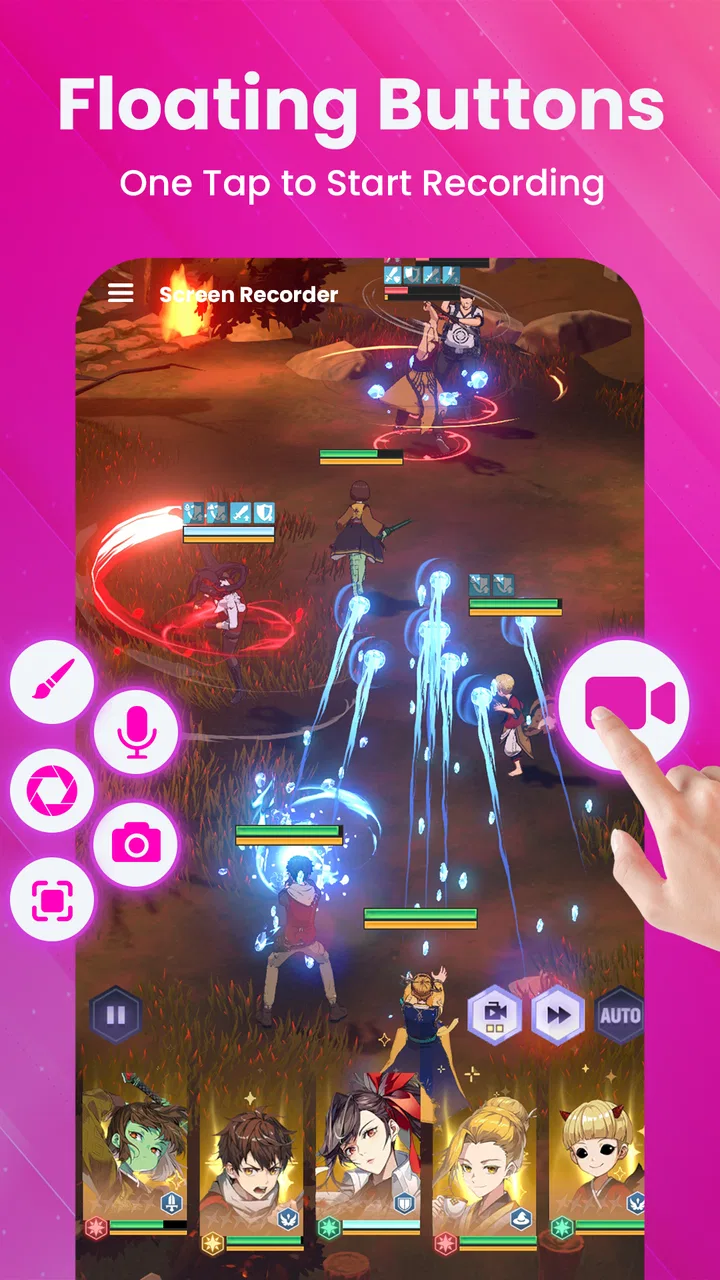
I spent time with Screen Recorder | Video Rec as a practical Android tool for capturing what is happening on a phone display. It belongs to the video players and editors category, but its everyday purpose is straightforward: record screen activity, with audio support positioned as part of the experience. That makes it relevant for tutorials, app demonstrations, troubleshooting clips, gaming highlights, and quick explanations that are easier to show than describe.
My first impression is that this is aimed at people who want a dedicated recorder rather than a complicated editing suite. The app is free to install, which makes it easy to test without committing money upfront. At the same time, it includes optional in-app purchases ranging from $4.99 to $29.99 per item, so the important question is not simply whether it costs nothing to download. The real question is whether the free experience covers your recording habits or whether the paid layer becomes necessary for the way you work.
How the free access and paid value fit together
The basic financial appeal is clear: I can begin using the recorder without paying an entry fee. That matters for occasional users who only need a clip now and then, such as showing a family member how to change a setting or sending a support video to an app developer. A free starting point also makes sense for students, casual creators, and anyone comparing screen recording tools before settling on one.
You May Also Like

 Blood Strike: 2.5 Anniversary
Blood Strike’s Loadouts Turn Every Drop Into a Tactical Gamble
A close look at Blood Strike’s custom loadouts: how fast access to signature weapons reshapes its battle royale rhythm, rewards preparation, and narrows the gap between fights.

 Pandora - Music & Podcasts
Pandora’s Music Is Easy to Start, but Harder to Recover
Pandora’s strength is its low-effort path from a seed to a station. Its weak spot is how much confidence it asks you to place in connection, setup, and quiet recovery.

 8 Ball Pool
 Is Built on Rivalries, Rematches, and Routine
A close look at the rivalries, rematches, shared routines, and unanswered safety questions that turn a quick pool match into a persistent mobile community.

 Samsung Music
’s Quiet Strength Is Playing What You Already Own
Its reach comes less from spectacle than from dependable access to a personal library. That simplicity is both the app’s strongest retention engine and its ceiling.

 AccuWeather: Weather Radar
AccuWeather Review: A Quick, Clear Forecast for Everyday Decisions
For everyday plans, the best forecast is the one you can understand quickly. AccuWeather makes rain timing, radar, and local conditions easy to act on, with a few trade-offs.

 Hill Climb Racing
Why Hill Climb Racing Still Turns Crashes Into One More Run
A tiny car, a bumpy hill and one more upgrade: Hill Climb Racing keeps resurfacing because its simple chaos makes every near-miss feel personal.
More From Our News Desk
View All News


The paid options change the value calculation for heavier users. Because individual purchases sit between $4.99 and $29.99, I would treat them as an upgrade decision rather than an automatic requirement. If your needs are limited to short, occasional captures, free access may be enough to justify keeping the app. If you record frequently, produce material for an audience, or depend on a smoother workflow, you should consider whether the specific paid benefits offered inside the app save enough time to warrant the cost.
I would not describe the purchase range as a reason to avoid the app by itself. It is more useful to see it as a boundary between testing and committing. Install it first, try the recording flow with the kind of content you actually make, and only then decide whether an upgrade improves your routine. That approach is especially sensible here because a screen recorder can look excellent in a store summary yet feel inconvenient once you use it during a real call, game, lesson, or troubleshooting session.
The app comes from Infinity Tech Systems and is available for devices running Android 6.0 or later. Its current version is 9.4, and the app has been available since July 8, 2023. Those details make it a fairly accessible option for people using older compatible phones, although compatibility alone does not guarantee that every device will record equally well. Phone performance, available storage, the app being recorded, and the audio source can all affect the practical result.
What I found useful in everyday recording
The strongest part of a screen recorder is not the button itself; it is how well the tool fits into a moment when you need to explain something quickly. I can imagine using this app when a relative says an Android setting is missing. Instead of writing a long sequence of instructions, I can record the path through the menus, speak over it if the audio setup works as intended, and send one compact demonstration. That workflow reduces misunderstandings and gives the other person something they can replay.
It is also a natural fit for app testing. A tester can capture a bug while it happens, including the steps that lead to it, rather than trying to recreate the issue in a written report. For developers and support teams, a short visual reproduction can be more useful than a vague description such as “the screen froze.” The recorder therefore has value even when the final video is never published.
For creators, the mention of FHD and UHD recording makes the app more interesting than a basic low-quality capture utility. Higher-resolution recording can help when small interface text needs to remain readable, particularly in tutorials or demonstrations of design-heavy apps. I would still judge the result on the actual phone rather than assuming that the highest label guarantees a perfect file. Recording at a demanding quality level can place more pressure on the device, and the practical choice may be a lower setting when stability matters more than sharpness.
Audio support is another meaningful advantage. A silent screen capture is useful for some visual walkthroughs, but spoken guidance often turns a raw recording into a lesson. I would use voice narration for explaining a multi-step task, while a game clip might benefit from preserving the original sound. The important habit is to make a short test recording before starting something that cannot be repeated. Audio routing can behave differently depending on what is open, what the phone permits, and whether another application is already using the microphone.
Three practical habits that improve the results
First, I would prepare the screen before pressing record. Close unrelated notifications, remove private information from view, and navigate to the starting point of the demonstration. This is more than cosmetic: a clean opening makes a short clip easier to understand and reduces the need to trim away dead time later. It is particularly valuable when recording a support video that may be viewed by someone who does not know the app or setting you are demonstrating.
Second, I would choose quality based on the destination instead of always selecting the most ambitious option. A high-resolution capture is useful when viewers need to inspect small details, but a simpler clip may be preferable for quick messaging or limited storage. This is a trade-off many store descriptions skip: the best setting is the one that preserves the information your viewer needs without making the recording unnecessarily heavy or demanding.
Third, I would make a short audio check before a long session. Say a few words, trigger the screen action you want to show, stop the recording, and review both the picture and sound. This catches the frustrating situation where the video looks correct but the explanation is missing, too quiet, or not captured in the way you expected. It also helps reveal whether the app being recorded produces sound that competes with your narration.
These habits do not turn the application into a full editing workstation, and that is an important distinction. The app’s main value is capture. If your workflow needs detailed cutting, captions, transitions, color correction, or a polished publishing pipeline, you may still need a separate editor. In that situation, this recorder can remain useful as the first step, but it should not be mistaken for an all-purpose production package simply because it appears in a category that includes video editors.
Where it compares well with usual alternatives
Android users often have three broad choices: a built-in screen recorder, a dedicated recorder such as this one, or a general video-editing app that also captures the screen. The built-in option is usually attractive because it is already on the phone and may require no extra setup. If you only record once every few months, that convenience can outweigh the reason to install another tool.
A dedicated app becomes more appealing when you want a recording-focused workflow and clearer attention to resolution and audio. Screen Recorder | Video Rec is positioned for that purpose, including FHD and UHD capture in its store summary. I see that as its main argument against relying solely on a basic system tool: it gives people who record more regularly a specialized place to start.
A general editor is better when capture is only one part of a larger creative process. If you need to assemble several clips, add titles, remove mistakes, and prepare a finished social video, an editor may save time after recording. On the other hand, an editor can feel excessive when all you want is a clean demonstration of a phone setting or a reproducible bug report. In those cases, this app’s narrower focus is an advantage rather than a weakness.
There is also a privacy and reliability angle to the comparison. I would prefer a focused recorder for a quick support clip, but I would still review the screen carefully before recording passwords, private messages, payment details, or personal notifications. No recording tool can make careless framing safe. The best workflow is to remove sensitive material from the visible screen and stop the capture promptly when the useful demonstration ends.
Limitations I would consider before installing
The first limitation is that recording quality is never determined by the app alone. A compatible Android version is only the starting point. Older or less powerful hardware may handle demanding capture differently from a newer device, and some apps may restrict or alter what can be recorded. I would therefore avoid promising myself a flawless UHD result before testing the exact phone and content I plan to use.
The second is the difference between capture and editing. Someone expecting a complete creator toolkit may be disappointed if the main workflow ends after recording. The app can be valuable as a recorder, but a person who wants a finished, heavily edited video should compare its role with a dedicated editor rather than judging it as though it were one.
The third is the paid layer. Free installation is a genuine benefit, but the optional purchases mean that frequent users should inspect the upgrade screen carefully before paying. I would want to know exactly which improvement I am buying and whether it addresses a real obstacle in my workflow. Paying simply because a premium option exists is poor value; paying to remove a limitation that repeatedly slows down important work can be reasonable.
The fourth is the need for a test run. Audio and quality expectations are too important to leave until the final take. This is not a criticism unique to one brand, but it affects how I would recommend using this app: treat the first recording as a setup check, not as proof that every future capture will behave identically.
Who will get the most from it
I think the app is a good match for Android users who regularly explain things visually. That includes people making short tutorials, support workers documenting problems, teachers demonstrating mobile workflows, and gamers capturing moments from their sessions. It also suits ordinary users who want a simple way to show a problem instead of describing it through several messages.
The free entry point is particularly useful for occasional recording. A person who needs one clip for a technical-support conversation or a family tutorial can try the app without turning the task into a purchase decision. The Everyone content rating also makes it broadly approachable for general audiences, although responsible handling of private on-screen information still matters regardless of age classification.
More demanding users may find value if the FHD and UHD positioning matches their devices and if audio recording works with their intended content. I would recommend testing a short game segment, app walkthrough, or narrated lesson before building a larger workflow around it. If that test produces a clear, stable result and the free tools meet your needs, the app has a convincing practical role.
I would steer away from it if your priority is a complete post-production environment, highly specialized streaming controls, or a workflow that must be identical across many different devices. In those cases, a built-in recorder may be simpler, while a more comprehensive production tool may be better for editing and publishing. I would also skip the paid tier if you record rarely and cannot identify a specific improvement that justifies the purchase.
My verdict after weighing the value
The app has earned a strong average rating of 4.8 from around 413 ratings, and it has passed the milestone of 100K+ installs. Those figures suggest that it has found an audience, but I would still base the decision on your recording habits rather than popularity alone. A screen recorder succeeds when it captures the right picture and sound at the moment you need it, without forcing you into a complicated process.
For me, the best reason to try Screen Recorder | Video Rec is the combination of free access, audio-oriented recording, and support for high-resolution capture. It can serve as a practical bridge between a phone’s basic built-in recorder and a full video editor. The most sensible approach is to start with a short, realistic test, prepare the screen carefully, check the audio, and then decide whether the free experience is sufficient.
My recommendation is to try it for occasional and regular screen capture, but treat paid upgrades as optional value rather than a default purchase. If you need quick tutorials, bug demonstrations, or clean visual explanations, it is worth a place on your Android shortlist. If your goal is elaborate editing or a tightly controlled professional production workflow, choose a tool designed for that job instead. In short, this is a useful recorder when you judge it as a focused capture app, not as a replacement for every other video tool on your phone.
FAQs for Screen Recorder | Video Rec
01What is Screen Recorder | Video Rec used for?
Screen Recorder | Video Rec is designed to capture activity on your device screen as a video. You can use it to record app demonstrations, gameplay, video calls, tutorials, presentations, or troubleshooting steps. After recording, the app generally lets you review the result and save or share it, making it useful for both casual users and content creators.
02Does Screen Recorder | Video Rec record internal audio and microphone sound?
Audio recording options can depend on your device model, Android or iOS version, and the permissions granted to the app. In supported situations, you may be able to record device audio, microphone input, or both. Before starting an important recording, check the audio settings and make a short test, since some protected apps may block internal sound capture.
03Can I record gameplay or other apps without showing a watermark?
The available recording features, including watermark removal, may vary according to the version of Screen Recorder | Video Rec and any premium options offered. Some recordings may include branding or limitations unless you upgrade. It is worth checking the in-app settings and the current store listing before downloading, especially if you need clean videos for publishing or professional use.
04Where are recordings saved, and can I edit or share them?
Completed recordings are usually stored in the application’s media folder or your device’s gallery, depending on the operating system and the permissions you allow. You can normally open, rename, delete, or share the files through the app or a standard gallery application. Basic recording tools may be included, while advanced editing could require another video editor.
05Is Screen Recorder | Video Rec safe to install and use?
A screen recorder needs sensitive permissions because it must capture what appears on your display and may access audio through the microphone. Install Screen Recorder | Video Rec only from a trusted official store, review the developer information and privacy policy, and grant only the permissions you understand. Avoid recording passwords, private conversations, banking screens, or other confidential content.
Pros
- Records gameplay and apps smoothly with adjustable video quality.
- Supports microphone audio for clear voice-over recordings.
- Simple controls make starting and stopping recordings quick.
- Includes basic tools for trimming and editing captured videos.
- Useful for creating tutorials
- demos
- and social media content.
Cons
- Higher resolutions can produce very large video files.
- Recording may reduce battery life during longer sessions.
- Some features may require in-app purchases or display ads.
- Audio recording can vary depending on device and Android version.
- Performance may be limited on older or less powerful devices.

Screen Recorder | Video Rec
Gallery